
Kalliope Sharing
Share your screen with whoever you want
Kalliope Sharing is an application to be installed on your computer that allows you to share your PC screen with other people connected to the Internet. In real time, you can show your screen to colleagues or customers while you type a letter with Word, model a 3D prototype with SketchUp, share a quote with Excel or present your offer with PowerPoint. It cancels distances and speeds up decision-making processes, reducing travel costs and your meeting organisation time.

Download the app to have it available on your device at all times.
Safety and ease of use
- each participant can show his screen to the others with a single mouse click
- each participant displays the list of participants
Efficiency
- communication is more precise because your remote interlocutor sees what you see
- facilitates the participants’ concentration on the meeting documents
- automatically adjusts your screen resolution to that of the other participants for clearer communication
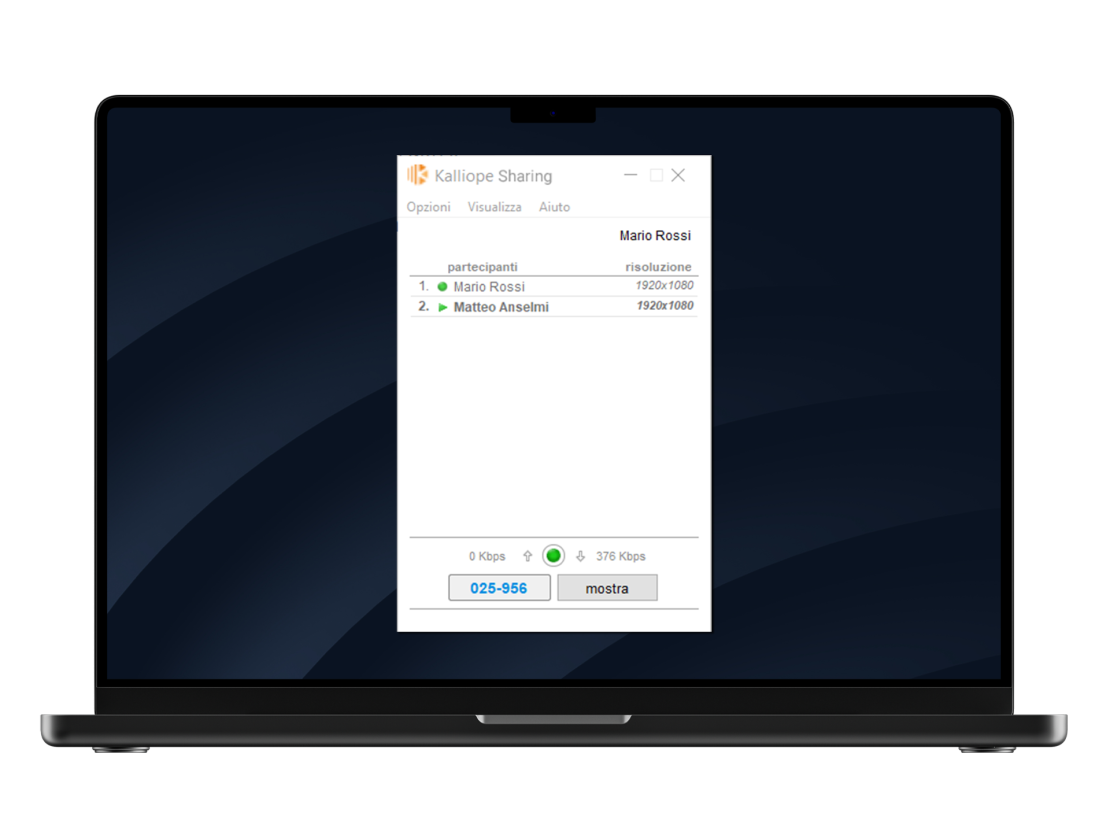
How it works
Phase 1
Download Kalliope Sharing for Windows or macOS, run the installation wizard on your computer and launch the application.
Phase 2
To join an already active session, type in the “session code” that was communicated to you by the moderator and click on the “Watch” button.
Phase 3
At any time, any participant in a session can show their screen to others by simply clicking on the ‘Show’button.
Phase 4
To abandon the session close the remote screen window or click on the “Exit” button if you are currently showing your screen.
Frequently Asked Questions (FAQ)
Welcome to the FAQ section dedicated to Kalliope Sharing. On our WIKI you will find clear and detailed answers to the most frequently asked questions